JetDeck SCOUT: A Clear Look at the Smart Cyber Ops Utility Tool

JetDeck SCOUT Explained: What “Smart Cyber Ops Utility Tool” Actually Means (And Doesn’t)
A maker built a pocket-sized Raspberry Pi computer around one deliberately unglamorous idea: it runs completely unmodified, off-the-shelf Linux. No custom firmware, no proprietary app, nothing to maintain beyond what the Raspberry Pi Foundation already supports. The “Smart Cyber Ops Utility Tool” name is the flashy part — the boring “stock OS” decision underneath it is the part actually worth understanding.
Transparency note: Wangdoo has not physically handled the JetDeck SCOUT. This article is based on the project’s Kickstarter campaign page, the maker’s Hackaday.io project log, and Hackster.io’s coverage of the device, all verified directly against those sources. No scores, verdicts, or hands-on impressions are given. The campaign is live and approaching its funding goal at the time of writing, and specifications may change before any units ship.
⚠️ Educational content only. This article explains what the JetDeck SCOUT is and how it fits into the broader category of handheld Linux computers used for networking, diagnostics, and security education. Any tools that can be run on this hardware — including network analysis or wireless diagnostic software — should only ever be used on networks and devices you own or have explicit, written authorisation to test. Always operate legally and ethically.
Most maker handhelds run into the same problem a year or two after launch: the custom OS image that made them special stops getting updates, and a once-capable piece of hardware quietly becomes a brick with a nice case. The JetDeck SCOUT is built around the opposite bet — strip out anything custom, and let the device’s lifespan ride on the Raspberry Pi Foundation’s own long-term support instead of one person’s spare time. Everything else about it, including the slightly tongue-in-cheek “Smart Cyber Ops Utility Tool” name, is really secondary to that one design decision.
If you’ve come across the name and wondered whether this is some kind of spy gadget, it isn’t — what you’re actually looking at is a pocket-sized Linux computer with a screen, a keyboard, and an unusually generous set of ports, designed by one maker for a community of people who like building their own tools.
Watch — What a Cyberdeck Actually Is
An overview of Raspberry Pi-based cyberdeck builds — the category the JetDeck SCOUT belongs to. Not affiliated with the JetDeck SCOUT project. Source: YouTube.
This piece breaks down what the JetDeck SCOUT actually is, what it can realistically be used for (including in a cybersecurity and networking context), and — just as importantly — who it’s probably not for.
What Is the JetDeck SCOUT?
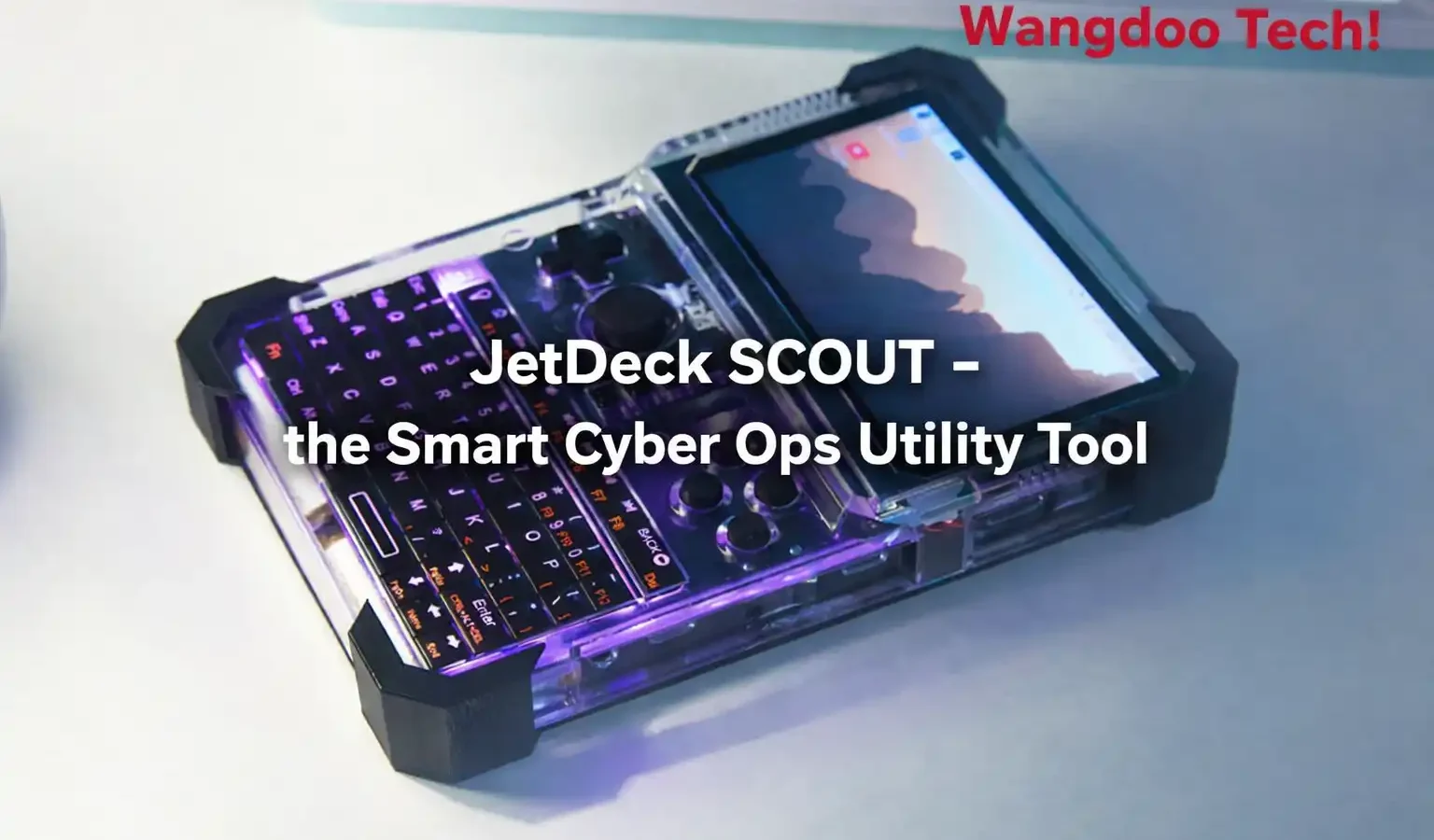
The JetDeck SCOUT is a handheld device — sometimes called a “cyberdeck” — built around a Raspberry Pi Compute Module 5, with CM4 also supported. It was designed by Tim Eastwood, a hardware maker who started the project as a rough prototype nicknamed “JankDeck” before redesigning it from scratch around a custom mainboard. In his own words on Hackaday, Eastwood describes himself as “a hardware hacker and maker who loves tinkering with tech, designing cool gadgets” who wanted to bring “a bit of my love for cyberpunk and open source independence” into the project.
A cyberdeck, for anyone unfamiliar with the term, is essentially a DIY portable computer with a distinctive, slightly retro-futuristic look — think exposed ports, chunky keyboards, and small screens, inspired by the “deck” devices in William Gibson’s cyberpunk novels. They’ve become a popular maker project over the past few years, usually built around Raspberry Pi boards, and Hackaday’s own project gallery for the SCOUT sits within a broader collection the site describes as “every single cyberdeck I could find.”
What makes the SCOUT notable within that scene is its emphasis on running completely standard software. According to Hackster.io’s coverage of the launch, it’s “built to require absolutely no custom software at all, running Raspberry Pi OS with zero modifications” — unlike, in Eastwood’s words, “other decks” that fall short on this front. Flash the OS to the board, and the screen, keyboard, gamepad, and ports are all expected to work out of the box.
The Hardware, in Plain Terms
The specification sheet on the project’s Kickstarter and Hackaday pages is long, so here’s the shortened version of what’s inside the roughly 120 x 180 x 18mm body:
| Component | What It Is |
|---|---|
| Processor | Raspberry Pi Compute Module 5, with CM4 / third-party compatible boards also supported — though CM4 loses USB 3.0 support |
| Display | 4.3″ 800×480 full-colour QLED screen, with a higher-resolution version as a stretch goal |
| Keyboard | Backlit QMK keyboard plus a digital direction pad |
| Gamepad | Nintendo JoyCon-inspired Hall effect analog joystick, toggleable between joystick and mouse modes, driven by a Raspberry Pi RP2040 microcontroller |
| Storage | M.2 PCIe slot for high-speed storage, plus standard microSD |
| Camera | OmniVision OV5647 5-megapixel rear-facing camera |
| Connectivity | Gigabit Ethernet, 5Gbps USB 3.0, HDMI out, M.2 B-key slot for optional 4G/WWAN module |
| Extras | NFC reader/writer (campaign-tier dependent), infrared transceiver, built-in speakers, 5V/3.3V power rails (6A each) for external hardware |
| Battery | 8000mAh, bidirectional USB-C Power Delivery charging |
That’s a lot of connectivity packed into something pocketable. The Ethernet port, 5Gbps USB 3.0, M.2 slot, and the GPIO-adjacent power rails together make this less of a “tiny laptop” and more of a portable lab bench for anyone who likes tinkering with networks, sensors, or electronics projects on the move.
Where the “Cyber Ops” Framing Comes From
The “Smart Cyber Ops Utility Tool” name and acronym are clearly a bit of fun on the maker’s part — Eastwood himself notes on Hackaday that “it was critical that it had a catchy acronym.” But the framing does reflect something real about why devices like this exist.
Because the SCOUT runs full, unmodified Linux on real hardware with Ethernet, USB 3.0, a camera, and an M.2 slot, it’s the kind of platform that’s commonly used by hobbyists and students for legitimate network and security education — things like learning how network traffic works, experimenting with your own home lab, monitoring your own IoT devices, or running open-source network analysis tools such as Wireshark on a small, portable screen. Eastwood’s own Hackaday profile lists prior projects in this space, including a description of one tool as built for “HID emulation, automation, and ethical security research.”
This is the same broad category of device as tools like the Flipper Zero, which has become well known for similar hobbyist radio and IoT experimentation. As with any such tool, the legal and ethical line is drawn by what you do with it and on whose network or devices — not by the hardware itself.
How Does This Compare to the Flipper Zero?
The Flipper Zero comes up a lot in discussions of the SCOUT, partly because of the “cyber ops” framing and partly because both devices appeal to a similar hobbyist audience. But the honest answer is that they’re not really direct competitors — they’re different categories of device that happen to overlap at the edges.
The Flipper Zero is a purpose-built radio and signal multi-tool, instantly recognisable by its Tamagotchi-inspired form factor. It runs its own dedicated firmware (not general-purpose Linux) and is built around a specific set of radio capabilities — sub-GHz RF in the 100MHz to 1.7GHz range, NFC, RFID, infrared, iButton, Bluetooth, and GPIO — all accessible through a simple on-device menu. It’s small, standalone, and designed so you rarely need to plug it into a computer to use it.
The JetDeck SCOUT is the opposite kind of device in almost every respect that matters here: it’s a general-purpose Linux computer first, with NFC and IR included as two ports among many — alongside gigabit Ethernet, 5Gbps USB 3.0 (on the CM5 configuration), an M.2 PCIe slot, and a 5MP camera. There’s no dedicated firmware or guided on-device menu for radio tasks — whatever you do with it, you’re doing as Linux software, the same way you would on a desktop.
| Flipper Zero | JetDeck SCOUT | |
|---|---|---|
| What it is | Purpose-built radio/signal multi-tool | General-purpose Linux handheld computer |
| Software | Dedicated custom firmware | Stock, unmodified Raspberry Pi OS |
| Sub-GHz radio | Built in (100MHz–1.7GHz) | Not included — would need an external SDR via USB |
| NFC / IR | Built in, dedicated menus | Built in (NFC tier-dependent), accessed via Linux software |
| Display & size | Small monochrome screen, very compact | 4.3″ colour QLED, larger handheld form factor |
| Networking | Bluetooth only | Gigabit Ethernet + Wi-Fi (via CM) + optional 4G/WWAN |
| Storage / expansion | microSD | M.2 PCIe slot + microSD |
| Learning curve | Low — guided on-device menus | Higher — assumes Linux/terminal familiarity |
| Status | Established, widely available product | Live Kickstarter campaign, not yet shipping |
In practice, the two devices suit different starting points. If what you actually want is a pocketable tool that reads NFC tags, captures IR remotes, and explores RF signals with minimal setup, the Flipper Zero remains the more focused option for exactly that job. If you want a small Linux computer with real networking hardware — Ethernet, USB 3.0, M.2 storage — that you can configure to do whatever you’d do on a desktop Linux box, just portable, the SCOUT is solving a different problem entirely. Some hobbyists end up wanting both, for different tasks, rather than choosing one over the other.
Who This Actually Makes Sense For
Based on the spec sheet and the maker’s own description of the project, the SCOUT seems aimed squarely at people already comfortable with Raspberry Pi and Linux who want a portable form factor for projects they’d otherwise run on a desk; hobbyists interested in home network diagnostics, IoT projects, or general-purpose tinkering; makers who want a Linux computer with real I/O — Ethernet, USB 3.0, M.2, a camera — for electronics projects on the move; and retro gaming or emulation fans, given the gamepad and screen size.
Raspberry Pi / Linux users wanting a portable dev box, home-lab and IoT hobbyists, electronics tinkerers who want real ports (not just USB-C), retro gaming and emulation fans.
Anyone wanting a phone/tablet replacement, complete Linux beginners, anyone hoping for a ready-made “hacking gadget” with no setup required, or buyers who need a product immediately rather than a crowdfunding timeline.
What the Marketing Doesn’t Tell You
A few practical points worth knowing before getting swept up in the spec sheet. First, several features are dependent on which pledge tier or Compute Module variant you choose — the NFC reader, for example, is noted on the campaign as tier-dependent, and certain connectivity options vary by which CM5/CM4 configuration you select. It’s worth reading the campaign’s own FAQ closely rather than assuming every spec applies to every pledge.
Second, this began life as a single maker’s personal project — documented on Hackaday as evolving from an early prototype into a custom-designed mainboard, with the project page itself noting it was created in April 2026 and updated as recently as 17 hours before this article’s research was conducted. That’s a point in its favour for build quality and design thought, but it also means this is a small, independent campaign without the manufacturing track record of larger crowdfunded electronics brands.
As of writing, the campaign has raised roughly $30,900 AUD of a $35,000 AUD goal from 97 backers, running from May 28 to June 27, 2026. It is close to its goal but not yet funded, and crowdfunding timelines — especially for Compute Module-based projects, where supply has been a recurring bottleneck across the Raspberry Pi ecosystem — can and frequently do slip. Treat any shipping estimate as provisional.
Third, as with most Compute Module-based projects, ongoing software support depends on the broader Raspberry Pi OS ecosystem rather than custom firmware from the maker — generally a good thing for longevity, but worth knowing if you’re expecting a dedicated companion app or proprietary interface.
My Take — Mr Wangdoo
What I find genuinely appealing about the SCOUT isn’t the “cyber ops” framing — it’s the “no custom software” promise. So many maker handhelds over the years have shipped with bespoke OS images that fall out of support within a year or two, leaving an otherwise capable piece of hardware stuck on old software. Building around stock Raspberry Pi OS means this device’s usable lifespan is tied to the Raspberry Pi Foundation’s own support, which is about as solid a bet as you can make in this space.
That said, go in with realistic expectations. This is a device built by one maker, for a device category that assumes you already know your way around a Linux terminal — and at the time of writing, it’s not yet shipping. If that describes you and you like the idea of a pocketable lab bench with real Ethernet and USB 3.0, the underlying design is genuinely worth watching. And if the name made you think this was a ready-made spy gadget, it’s worth recalibrating — the most accurate description is on the tin: a Linux handheld for tinkering, with a fun acronym attached.
Frequently Asked Questions
What is the JetDeck SCOUT?
The JetDeck SCOUT is a handheld “cyberdeck” — a DIY-style portable Linux computer — built around a Raspberry Pi Compute Module 5 (CM4 also supported). It features a 4.3″ 800×480 display, a backlit QMK keyboard, a JoyCon-inspired analog gamepad, an M.2 PCIe slot, gigabit Ethernet, 5Gbps USB 3.0, and an 8000mAh battery. It’s designed by maker Tim Eastwood and is currently funding on Kickstarter.
What does “Smart Cyber Ops Utility Tool” actually mean?
It’s primarily a fun backronym for “SCOUT” — the maker himself has said on Hackaday that having a catchy acronym was a priority. Functionally, the device is a general-purpose handheld Linux computer. The “cyber ops” framing reflects that this category of hardware — full Linux, real networking ports, GPIO access — is commonly used by hobbyists for legitimate network diagnostics and security education, not that the device itself is a specialised hacking tool out of the box.
Does the JetDeck SCOUT require special software?
No — this is one of its key design goals. According to Hackster’s coverage of the launch, the SCOUT is built to run completely unmodified Raspberry Pi OS, with no custom drivers or special builds required. Flash the standard OS image and the screen, keyboard, gamepad, and ports are designed to work out of the box.
Is the JetDeck SCOUT a good first Linux device?
Probably not for complete beginners. While the device avoids custom software, getting real value out of it assumes comfort with flashing OS images, working in a terminal, and troubleshooting hardware. It’s better suited to people who already use Raspberry Pi or Linux and want a portable form factor for projects they’d otherwise run on a desk.
When will the JetDeck SCOUT ship, and is it funded?
As of writing, the campaign has raised approximately $30,900 AUD toward a $35,000 AUD goal from 97 backers, running May 28 to June 27, 2026 — close to its goal but not yet funded. As with any crowdfunding campaign, and Compute Module-based projects in particular given recurring supply bottlenecks across the Raspberry Pi ecosystem, shipping timelines should be treated as provisional rather than fixed.
- Hackster.io — Tim Eastwood Unveils the JetDeck SCOUT, a Raspberry Pi-Powered Handheld Running Mainstream Software (April 14, 2026)
- Hackaday.io — Jetdeck SCOUT project page — full specification list and development log
- Kickstarter — JetDeck SCOUT — the Smart Cyber Ops Utility Tool, campaign page
- Kicktraq — JetDeck SCOUT funding tracker — backers, pledges, and campaign dates