What Is CardputerZero? M5Stack’s Pocket Linux Computer Explained

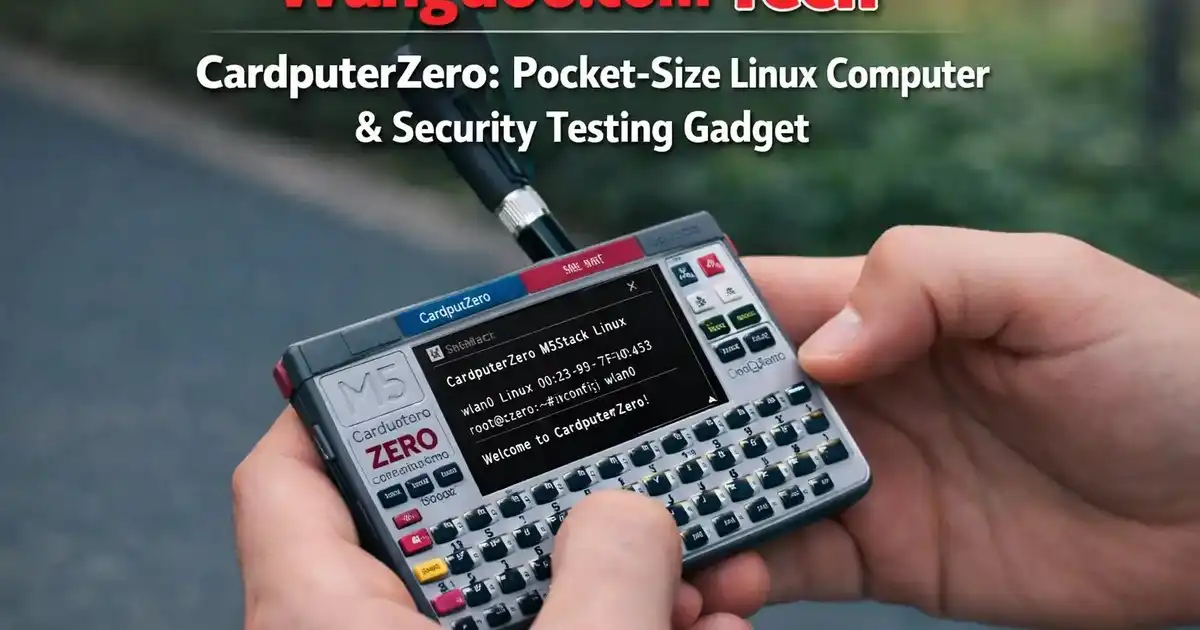
CardputerZero Explained: M5Stack’s Pocket Linux Computer — Specs, Price and How It Compares to Kode Dot and Flipper Zero
M5Stack launched the CardputerZero on Kickstarter on May 26, 2026 — a credit-card sized Linux computer powered by the Raspberry Pi CM0, with a 46-key keyboard, 1.9-inch display, 8MP camera, Wi-Fi, Bluetooth, and Ethernet in a device smaller than your wallet. Here is everything confirmed about what it is, which model to choose, and how it stacks up against the two most popular pocket devices in the maker community.
Editorial transparency: Wangdoo.com has not physically tested the CardputerZero. This article was written independently — Wangdoo.com was not paid, sponsored, or contacted by M5Stack to write this article and received no compensation of any kind. This article is a factual overview based on the official M5Stack Kickstarter campaign, the M5Stack official product page, the M5Stack press release (May 26, 2026), CNX Software technical analysis (May 25, 2026), Hackster.io preview (April 21, 2026), and LinuxGizmos preview (April 19, 2026). All specifications are sourced from primary documentation. Where any commercial relationship develops in the future, it will be disclosed clearly at the top of the relevant article.
Every few years a device comes along that the maker community reaches for instinctively — something that fits in a pocket, boots into a real OS, and immediately answers the question: what can I do with this? The original M5Stack Cardputer did that in 2023 with an ESP32 chip and a tiny keyboard. The CardputerZero does it again in 2026 — but this time it runs Linux.
That difference is significant. An ESP32 is a microcontroller — capable and beloved, but constrained. The Raspberry Pi Compute Module Zero (CM0) inside the CardputerZero is a full Linux computer — powered by the BCM2837, the same quad-core Cortex-A53 silicon used in the Raspberry Pi 3 and Pi Zero 2W. Same credit-card footprint. Same iconic keyboard. But now you can SSH into a server, run Python scripts, execute network diagnostics, connect a camera, play MP3s, and access the entire Raspberry Pi OS software ecosystem — from a device smaller than your wallet.
The CardputerZero is a pocket Linux computer by M5Stack, powered by the Raspberry Pi Compute Module Zero (CM0) with a Broadcom BCM2837 quad-core Arm Cortex-A53 CPU at 1GHz, 512MB LPDDR2 RAM, a 1.9-inch LCD, 46-key keyboard, 8MP Sony IMX219 camera (full model), Wi-Fi, Bluetooth 4.2, 10/100M Ethernet, HDMI output, and a 1,500mAh battery. Two models: CardputerZero Lite at $99 retail / $59 super early bird and CardputerZero at $149 retail / $89 super early bird. Kickstarter launched May 26, 2026. Compatible with 100+ M5Stack add-on modules. OS: Raspberry Pi OS (customised build).
M5Stack CardputerZero — maker community first look, May 2026
Who Makes the CardputerZero and Why It Exists
M5Stack is a Hong Kong-based hardware company founded by Jimmy (CEO and Founder — surname not confirmed in official press materials). It has built a global reputation in the maker and IoT development community for producing modular, open-source hardware that ships reliably and connects to a wide ecosystem of sensors, displays, and expansion modules. The original Cardputer — launched in 2023 — became one of M5Stack’s most popular products, establishing itself as a favourite among ESP32 developers, security researchers, and hobbyists who wanted real processing power in a pocketable form factor.
The CardputerZero exists because the original Cardputer had one constraint that no firmware update could fix: it ran on an ESP32 microcontroller. The ESP32 is excellent at real-time tasks, wireless communication, and embedded control — but it does not run Linux. It cannot run a full Python environment natively. It cannot act as a proper SSH terminal. It cannot run the thousands of tools that exist as standard Linux packages. The CardputerZero’s Raspberry Pi CM0 removes that constraint entirely.
The original Cardputer built a remarkable community in just three years. M5Stack’s own data confirms that community-developed software projects — including M5Launcher, Bruce, and Evil-Cardputer — have each surpassed 50,000 downloads through M5Burner, the official firmware management tool. Over 5,000 people subscribed to be notified before the CardputerZero Kickstarter even launched. That is the installed base the CardputerZero is launching into.
Full Confirmed Specifications
Several publications — including Hackster.io — incorrectly listed the CardputerZero’s SoC as BCM2835. The official Raspberry Pi CM0 datasheet confirms the correct chip is the BCM2837 — the quad-core Cortex-A53 used in the Raspberry Pi 3 and Pi Zero 2W. BCM2835 is a single-core ARM1176JZF-S used in the original Pi Zero and Pi 1. The distinction matters for performance expectations. All specs in this table are verified against the official Raspberry Pi CM0 datasheet. M5Stack has not yet confirmed the exact OS build name — described officially as a “customised Raspberry Pi OS.”
| Specification | CardputerZero |
|---|---|
| SoC | Raspberry Pi Compute Module Zero (CM0) — Broadcom BCM2837 Confirmed — official CM0 datasheet |
| CPU | Quad-core ARM Cortex-A53 (ARMv8) at 1GHz — same silicon die as Raspberry Pi 3 / Pi Zero 2W |
| GPU | VideoCore-IV at up to 400MHz — H.264 encode/decode up to 1080p30 |
| RAM | 512MB LPDDR2 |
| Display | 1.9-inch LCD (ST7789V2 driver) |
| HDMI output | Yes — up to 1080p30 via HDMI port |
| Keyboard | 46-key matrix keyboard — same design as original Cardputer |
| Camera | Sony IMX219 8MP Full model only |
| IMU | 6-axis (accelerometer + gyroscope) Full model only |
| microSD | 32GB included Full model only / slot available on Lite |
| Wi-Fi | 2.4GHz 802.11 b/g/n |
| Bluetooth | Bluetooth 4.2 / BLE |
| Ethernet | 10/100M wired Ethernet |
| USB | 2× USB-C (host/slave switchable) + 1× USB-A host port |
| GPIO | 14-pin GPIO header |
| Grove port | Yes — I2C Grove interface for M5Stack sensor ecosystem |
| IR | IR transceiver (transmit and receive) |
| Audio | MEMS microphone + 1W speaker + 3.5mm TRS jack |
| RTC | Real-time clock module |
| Battery | 1,500mAh LiPo rechargeable (USB-C charge) |
| Add-on modules | Compatible with 100+ M5Stack modules via Grove and GPIO |
| OS | Custom Raspberry Pi OS build (Linux) — exact version TBC |
| Retail price — Lite | $99 (MSRP) / $59 super early bird Kickstarter |
| Retail price — Full | $149 (MSRP) / $89 super early bird Kickstarter |
| Kickstarter launched | May 26, 2026 |
Two Models — Which One to Choose
- CM0 processor, 512MB RAM
- 1.9-inch LCD display
- 46-key keyboard
- Wi-Fi, Bluetooth, Ethernet
- HDMI output, GPIO, Grove port
- IR transceiver, mic, speaker
- 1,500mAh battery, USB-C
- No camera
- No IMU
- No bundled microSD
- Everything in Lite, plus:
- Sony IMX219 8MP camera
- 6-axis IMU (accel + gyro)
- 32GB microSD pre-loaded
- Ideal for computer vision, motion sensing, and multimedia projects
How to decide between the two models: The Lite ($59 early bird / $99 retail) includes the full Linux platform, keyboard, display, Wi-Fi, Ethernet, HDMI and battery — everything needed for SSH terminals, Python development, and network diagnostics. The full CardputerZero ($89 early bird / $149 retail) adds the Sony IMX219 8MP camera, 6-axis IMU, and 32GB microSD — the components required for computer vision projects, motion sensing, video capture, and multimedia applications. Both models run the same Linux OS and have identical connectivity.
What Can You Actually Do With the CardputerZero?
Pocket SSH Terminal
SSH into servers, Raspberry Pi clusters, or network devices directly from the keyboard. No phone hotspot, no laptop — just the CardputerZero, Ethernet or Wi-Fi, and a terminal session.
Python & Scripting
Run full Python 3 scripts natively on the CM0. Install packages from pip. Debug code in the field without needing a laptop. The entire Raspberry Pi Python ecosystem is available.
Network Diagnostics
Run nmap, tcpdump, ping, traceroute, netcat, and every standard Linux network tool from a device that fits in your pocket. Ethernet provides a wired connection when Wi-Fi is not an option.
Computer Vision (Full model)
The Sony IMX219 camera combined with OpenCV on Raspberry Pi OS enables object detection, QR scanning, and image capture projects — in a device smaller than most cameras.
Wireless Research
With optional Cap CC1101 add-on: NFC and sub-GHz (CC1101) protocol experimentation. With LoRa Cap add-on: long-range mesh networking and Meshtastic-style off-grid communication.
Retro Gaming & Media
Run emulators, play MP3s, output video via HDMI. The CardputerZero can connect to a TV or monitor and function as a proper Raspberry Pi entertainment system.
CardputerZero vs Kode Dot vs Flipper Zero — The Full Comparison
This is the question the maker community is actively debating right now. Three pocket devices. Three different philosophies. Here is the honest side-by-side:
| Feature | CardputerZero | Kode Dot | Flipper Zero |
|---|---|---|---|
| Primary purpose | Pocket Linux computer | Open-source maker device / app platform | Pentesting / RF security research |
| Processor | Raspberry Pi CM0 — ARM Cortex-A53 quad-core 1GHz | ESP32-P4 + ESP32-C6 dual MCU (upgraded from ESP32-S3 via Kickstarter stretch goal — shipping config) | STM32WB55 (Cortex-M4 application core) |
| RAM | 512MB LPDDR2 | Not specified (ESP32 PSRAM) | 256KB SRAM |
| Operating system | Full Linux (Raspberry Pi OS) | kodeOS (custom Arduino-based app launcher) | Flipper OS (custom embedded OS) |
| Display | 1.9-inch LCD (colour, ST7789V2) | 2.13-inch AMOLED touchscreen (502 × 410 resolution) | 1.4-inch monochrome LCD (no touch) |
| Keyboard | 46-key physical keyboard | None — touchscreen only | 4-button directional input only |
| Camera | Sony IMX219 8MP (full model) | None | None |
| Wi-Fi | 802.11 b/g/n built-in | Wi-Fi 6 (ESP32-C6) built-in | Not built-in — needs add-on board |
| Bluetooth | Bluetooth 4.2 / BLE | Bluetooth 5 (ESP32-C6) | Bluetooth 5.4 built-in |
| Ethernet | 10/100M built-in | None | None |
| NFC / RFID | Via optional add-on module (Cap CC1101) | Built-in (stretch goal — all backers) | Built-in |
| Sub-GHz radio | Via optional Cap CC1101 add-on | Via separate Hacking Module | Built-in (315/433/868/915 MHz) |
| IR transmitter/receiver | Built-in | Built-in (stretch goal) | Built-in |
| GPIO expansion | 14-pin GPIO + Grove port + 100+ modules | 14 GPIO pins + expansion connectors | 8-pin GPIO header |
| HDMI output | Yes — 1080p30 | No | No |
| Python / Linux tools | Full — native Raspberry Pi OS | Via Arduino / ESP-IDF toolchain | C/SDK only — no Python natively |
| Open source | Yes — Raspberry Pi OS + M5Stack open hardware | Fully open source post-Kickstarter | Firmware open source on GitHub |
| Retail price | $99 (Lite) / $149 (full) | ~$129 Kickstarter — retail price TBC post-campaign | ~$169 USD / €229 EU |
| Availability | Kickstarter live — shipping TBC | Ships July 2026 | Available now |
When CardputerZero Is the Right Choice
If you want a device that runs real Linux, supports a physical keyboard for terminal work, has Ethernet for wired networking, can output to an HDMI display, and costs under $100 — the CardputerZero Lite is the strongest option in this comparison. It is the only pocket device of the three that puts a full Linux OS in your hand with a proper keyboard attached.
When Kode Dot Is the Right Choice
If you want to build and deploy custom applications — with kodeOS saving your Arduino sketches as icon-based apps, an AMOLED touchscreen, built-in NFC, and the ESP32-P4’s AI acceleration capabilities — the Kode Dot is purpose-built for that workflow. It ships July 2026 with a clearer software development story than the CardputerZero’s current “customised Raspberry Pi OS” approach.
When Flipper Zero Is the Right Choice
If your primary focus is RF security research — sub-GHz signal capture and replay, NFC cloning, IR brute forcing, and wireless protocol analysis — the Flipper Zero’s built-in sub-1GHz transceiver remains its strongest differentiator. It is also available now, with five years of community firmware development behind it.
The CardputerZero, Kode Dot, and Flipper Zero solve different problems. The CardputerZero is a Linux terminal you can carry in your pocket. The Kode Dot is an app-based maker platform. The Flipper Zero is a wireless security research tool. Many serious makers will eventually own all three — they are complements, not competitors.
The M5Stack Ecosystem — 100+ Add-On Modules
One of CardputerZero’s strongest advantages is access to the existing M5Stack module ecosystem. Over 100 add-on modules connect via the Grove interface and GPIO header — including environmental sensors, displays, motor drivers, LoRa radios, cellular modems, GPS units, and more. For makers who already own M5Stack sensors from previous projects, the CardputerZero is a natural upgrade that reuses their existing hardware investment.
Two modules are particularly relevant to the CardputerZero’s wireless capabilities:
- Cap CC1101 — adds NFC and sub-GHz (CC1101 transceiver) support, enabling wireless protocol experimentation in the same frequency ranges as the Flipper Zero’s built-in radio
- LoRa Cap — adds long-range LoRa wireless communication for off-grid mesh networking, Meshtastic projects, and IoT sensor deployments
CardputerZero is available via the official M5Stack Kickstarter campaign, which launched May 26, 2026 and runs for approximately one month. The super early bird tier ($59 Lite / $89 full) was available via a $1 reservation deposit through the M5Stack store before launch. The standard Kickstarter early bird was listed at $104 for the first 72 hours. After the campaign closes, retail pricing is expected at $99 (Lite) and $149 (full) through the M5Stack store at shop.m5stack.com. Shipping fees vary by region and are listed in the Kickstarter shipping table. For support: [email protected].
Frequently Asked Questions
What is the CardputerZero?
What is the difference between CardputerZero and the original M5Stack Cardputer?
How does CardputerZero compare to Kode Dot?
How does CardputerZero compare to Flipper Zero?
What operating system does CardputerZero run?
How much does CardputerZero cost?
What can I build with CardputerZero?
Is CardputerZero compatible with existing M5Stack modules?
Is the CardputerZero better than a Raspberry Pi Zero 2W?
Can CardputerZero run Python?
What is the difference between CardputerZero and the original M5Stack Cardputer?
Does CardputerZero work as a Flipper Zero alternative?
Sources & References
- M5Stack Official — CardputerZero launch announcement, May 26, 2026
- M5Stack CardputerZero Official Product Page — specs, pricing, FAQ
- CardputerZero Kickstarter Campaign — live May 26, 2026
- CNX Software — CardputerZero Raspberry Pi CM0 pocket computer (technical analysis), May 25, 2026
- Hackster.io — M5Stack CardputerZero preview including Hackster hardware specs confirmation, April 21, 2026
- LinuxGizmos — CardputerZero CM0 system preview, April 19, 2026
- Raspberry Pi Official — Compute Module Zero (CM0) Datasheet (confirms BCM2837, quad-core Cortex-A53, 512MB LPDDR2, 1GHz)
- Raspberry Pi Official — Processor documentation (confirms BCM2837 = quad-core Cortex-A53; BCM2835 = single-core ARM1176JZF-S)
- Newswire — M5Stack official press release, May 26, 2026