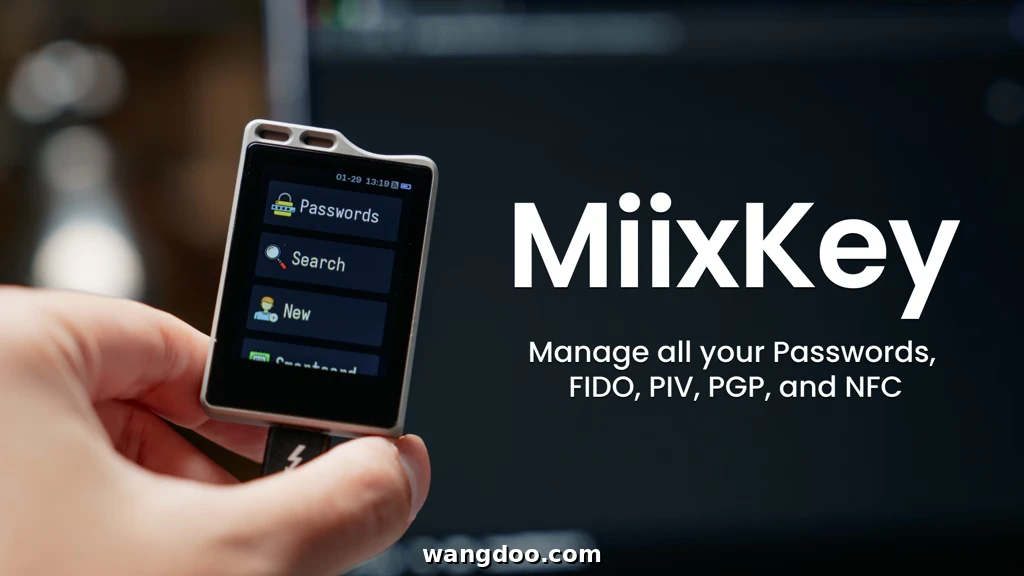
MiixKey Review: The Hardware Key That Kills Cloud Password Managers
A 2-inch touchscreen, 3,000+ offline passwords, five smart card slots, FIDO2, PIV, OpenPGP, and TOTP — all in one pocket-sized device. MiixKey is the most ambitious security key ever crowdfunded.
Password breaches are making headlines almost daily. Most people rely on cloud-based password managers — convenient, yes, but they come with a critical vulnerability: if the cloud gets hacked, so do you. MiixKey is the hardware answer to that problem.
▶ MiixKey official demo — Kickstarter campaign video
Developed by MiixPro, MiixKey is a compact hardware security key with a built-in 2-inch touchscreen that stores and manages your passwords, passkeys, and smart card credentials entirely offline. No cloud. No phone app. No browser extension. Just you and your data, encrypted and in the palm of your hand.
The project is currently live on Kickstarter and has already surpassed its funding goal. Here is everything you need to know about whether it deserves a place in your security setup.
01 What Is MiixKey?
MiixKey is a hardware security key and offline password manager in one. Unlike traditional security keys — such as YubiKey or Google Titan, which are excellent for FIDO2 login but offer no display or on-device credential management — MiixKey adds a touchscreen that lets you create, search, edit, and manage credentials directly on the hardware itself.
Under the hood it runs the ESP32-P4: a dual-core 32-bit RISC-V processor clocked at up to 400 MHz, with AI instruction extensions and a floating point unit. That is serious silicon for a device this compact.
🔍
Editorial note: MiixKey is a pre-shipping crowdfunded product. All hardware specifications and features come from MiixPro’s Kickstarter campaign page and independent coverage by CNX Software and Hackster.io. We have verified the hardware claims against the ESP32-P4 datasheet and KeePass KDBX compatibility documentation.
Stores credentials in KeePass-compatible KDBX format. Import your existing KeePass or KeePassXC database directly. Zero cloud dependency — your data never leaves the device.
🖥️
Built-In 2-Inch Touchscreen
Browse, search, add, and delete passwords directly on the device. No companion app required. The standout differentiator from every other hardware key on the market.
🔑
5 Independent Smart Card Slots
Each slot has its own PIN and independently supports FIDO2, PIV, and OpenPGP. Up to 64 passkeys per slot — 320 total across the device.
📲
Auto-Fill via USB & Bluetooth
Acts as an HID keyboard emulator over USB or Bluetooth to auto-fill credentials. Works across Windows, macOS, Android, and iOS.
📟
Built-In TOTP Generator
Two-factor authentication codes generated entirely on-device. No separate authenticator app needed. All operations performed locally without any internet dependency.
💳
NFC Card Storage
Stores up to 8 NFC cards for building access, transit, or contactless payment emulation. Useful for enterprise and daily commuters alike.
🛠️
Custom Scripts & BadUSB
Power users can load custom scripts or use BadUSB to emulate a keyboard and automate keystroke sequences. A niche but powerful feature for security professionals.
📤
QR Code & NFC Tag Sharing
Generate QR codes and NFC tags on-device to share credentials securely with trusted users. Useful for households and small teams sharing logins.
Specification
Detail
Processor
ESP32-P4 · Dual-core RISC-V · Up to 400 MHz
Password storage
3,000+ credentials (KeePass KDBX format)
Display
2-inch touchscreen
Smart card slots
5 × independent (FIDO2 / PIV / OpenPGP each)
Total FIDO2 passkeys
320 (64 per slot × 5 slots)
Encryption
AES-256 bit
Connectivity
USB + Bluetooth
NFC card storage
Up to 8 NFC cards
2FA / TOTP
✓ Built-in, fully offline
OS compatibility
Windows, macOS, Android, iOS
Database format
KeePass KDBX (compatible with KeePassXC)
03 How Does It Compare?
Traditional hardware security keys like YubiKey 5 and Google Titan are excellent at what they do — but they are single-purpose authentication tokens. MiixKey is a fundamentally different proposition: it combines a hardware key with a full offline password manager and a touchscreen interface, in the same pocket-sized form factor.
Feature
MiixKey
YubiKey 5
Google Titan
Touchscreen
✓
✗
✗
Password Manager
✓ 3,000+
✗
✗
FIDO2 / Passkeys
✓
✓
✓
PIV Smart Card
✓
✓
✗
OpenPGP
✓
✓
✗
NFC
✓
✓
✓
Bluetooth
✓
✗
✓
TOTP / 2FA built-in
✓
✗
✗
Multiple key slots
✓ (5 slots)
✗ (1)
✗ (1)
Offline-only
✓
✓
✓
💡
Context matters: YubiKey 5 remains the gold standard for pure hardware authentication reliability. MiixKey’s advantage is breadth — it consolidates a hardware key, password manager, TOTP app, and NFC card wallet into one device. If you need all of those, MiixKey makes a compelling case. If you need only FIDO2 authentication and proven enterprise durability, YubiKey remains the benchmark.
04 Who Is MiixKey For?
🔒
Privacy-Conscious Individuals
Don’t want passwords stored in the cloud? MiixKey gives you full control — everything stays on the device.
🛡️
Cybersecurity Professionals
Multi-slot smart card support with FIDO2, PIV, and OpenPGP across 5 independent slots is rare in a single device.
💻
Developers & Power Users
BadUSB support and custom scripting make MiixKey a capable tool for automation, penetration testing labs, and security research.
🏢
Enterprise & Government Staff
PIV and OpenPGP compliance built-in across multiple slots — relevant for organisations with smart card authentication requirements.
🗝️
KeePass / KeePassXC Users
Already have a KDBX database? Import it directly onto MiixKey and carry your vault in hardware form, without a phone.
🏠
Households & Small Teams
QR code and NFC tag sharing lets you securely hand off credentials to trusted people without a cloud service in the middle.
If you are already using a cloud-based password manager like 1Password, Bitwarden, or LastPass and have never experienced a breach, MiixKey may feel like overkill. But if you have been affected by a cloud breach — or simply prefer that your credentials exist in exactly one physical place — MiixKey fills a gap that no other single device currently covers.
The appeal of owning your data outright — rather than trusting it to third-party servers — is the same philosophy behind purpose-built capture hardware. If you’re interested in other compact hardware devices that do a specialised job exceptionally well, our Revopoint POP 4 3D Scanner review covers another device that brings professional-grade capability into a highly portable form factor. Different category, same principle: dedicated hardware beats cloud-dependent alternatives for speed, reliability, and data ownership.
05 Kickstarter Campaign Details
Early Bird Price
$99
Limited early backer tier
Standard Kickstarter
$109
Standard campaign price
Funding Goal
10K HKD
~$1,276 USD — already exceeded
Est. Delivery
Jul ’26
Subject to production schedule
⚠️
Crowdfunding risk disclosure: MiixKey is a pre-shipping product. Estimated delivery is July 2026. As with all crowdfunded hardware, there is inherent risk of delays, specification changes, or project complications. The campaign has surpassed its funding goal, hardware specifications are detailed and technically credible, and CNX Software has independently verified the ESP32-P4 claims — but back with the risk tolerance appropriate to any crowdfunded product. Always conduct your own research before pledging.
06 Pros & Cons
✓ What We Like
Only hardware key with a built-in touchscreen and password manager
Full offline operation — credentials never leave the device
KeePass KDBX compatibility — works with millions of existing databases
5 independent smart card slots with FIDO2 + PIV + OpenPGP each
320 total FIDO2 passkeys across all slots
Built-in TOTP — no separate authenticator app required
USB + Bluetooth dual connectivity across all major OS platforms
NFC card storage useful for building access and transit
No independent hands-on review yet (not shipped to press)
BadUSB capability requires responsible and careful use
ESP32-P4 is capable but not a dedicated secure element like YubiKey’s chip
Small HKD funding goal — scale of production capacity unclear
No public audit of firmware or security architecture yet
07 Frequently Asked Questions
Is MiixKey compatible with my existing KeePass database?
Yes. MiixKey uses the KeePass KDBX format, which is the same format used by KeePass and KeePassXC. You can import your existing database directly onto the device. This makes it immediately useful for the millions of people already using KeePass without requiring any data migration or conversion.
What happens if I lose MiixKey?
All data on MiixKey is protected by AES-256 encryption and requires a PIN to access. A lost device cannot be read without the correct credentials. MiixPro recommends maintaining a secure backup of your KDBX database file — which you can store encrypted on a secondary offline device or encrypted USB drive. The KeePass format is well-supported across many applications for recovery purposes.
How is MiixKey different from YubiKey?
YubiKey is a purpose-built hardware authentication token with an exceptional security track record. It excels at FIDO2 and smart card authentication but stores no passwords and has no display. MiixKey adds a touchscreen, offline password manager, TOTP generator, NFC card storage, and 5 independent smart card slots — making it a broader, more general-purpose credential device. YubiKey remains the benchmark for pure authentication reliability; MiixKey trades some of that specialisation for significantly broader functionality.
Is the BadUSB feature dangerous?
BadUSB allows MiixKey to emulate a keyboard and automatically type keystrokes or execute command sequences on a connected computer. In legitimate use this is powerful for automation — for example, typing a complex password or running a setup script. Like any programmable HID tool, it can be misused, which is why MiixPro positions it as a feature for power users and developers with an understanding of the security implications. Used responsibly and only on devices you own and control, it is a genuinely useful tool.
When will MiixKey ship?
Estimated delivery is July 2026, per the Kickstarter campaign. Crowdfunded hardware projects do sometimes experience delays — particularly at the manufacturing and quality testing stage. Monitor MiixPro’s Kickstarter updates for the most current production schedule. The campaign has already exceeded its funding goal, which is a positive signal for production momentum.
Does MiixKey work on iPhone and Android?
Yes. MiixKey connects via USB or Bluetooth and works across Windows, macOS, Android, and iOS. The HID keyboard emulation approach means it can auto-fill credentials without requiring a dedicated app — it simply types the password as if you had typed it yourself on a keyboard. Bluetooth connectivity is particularly relevant for iOS where USB-C support depends on your iPhone model.
⚡ Wangdoo Verdict
MiixKey is the most feature-complete hardware security key ever crowdfunded. A touchscreen, 3,000+ offline passwords, five smart card slots, built-in TOTP, NFC storage, and Bluetooth — all in one offline device at $99. If cloud breaches concern you, or if you simply want total control over your credentials without depending on any third-party service, MiixKey is absolutely worth backing. Just go in clear-eyed: it’s crowdfunded hardware, not a shipping product yet.
Disclosure: This article contains a link to the MiixKey Kickstarter campaign. Wangdoo.com is not financially affiliated with MiixPro and has received no compensation for this coverage. All opinions are our own. Always conduct your own research before backing a crowdfunding campaign.
References & Sources
1
MiixPro · Kickstarter · 2026
MiixKey — The World’s First Security Key with a Touchscreen